
Receipts
When it comes to receipts, what you receive and where to find it depends on which Truemed path you used. Your receipt is one of the two documents you need to submit a successful reimbursement claim — the other is your Letter of Medical Necessity (LMN).
Truemed payment at checkout (orders)
If you paid directly with your HSA or FSA card at the merchant’s checkout, Truemed processed your payment and automatically generates a receipt for you.
Where to find your receipt:
- Check your email. A receipt is sent from Truemed shortly after your purchase is qualified. Search your inbox for an email from Truemed referencing your purchase or receipt. If you don’t see it, check your spam or promotions folder.
- Log into your Truemed dashboard at truemed.com. Your receipt is available from the Download Documents section on your Overview page and from the individual order in the Orders tab, where you can view or download it as a PDF at any time.
What the Truemed receipt includes:
- The merchant name where the purchase was made
- The product name and description
- The eligible amount (the portion that qualifies for HSA/FSA reimbursement)
- The date of purchase
- Your name as the account holder
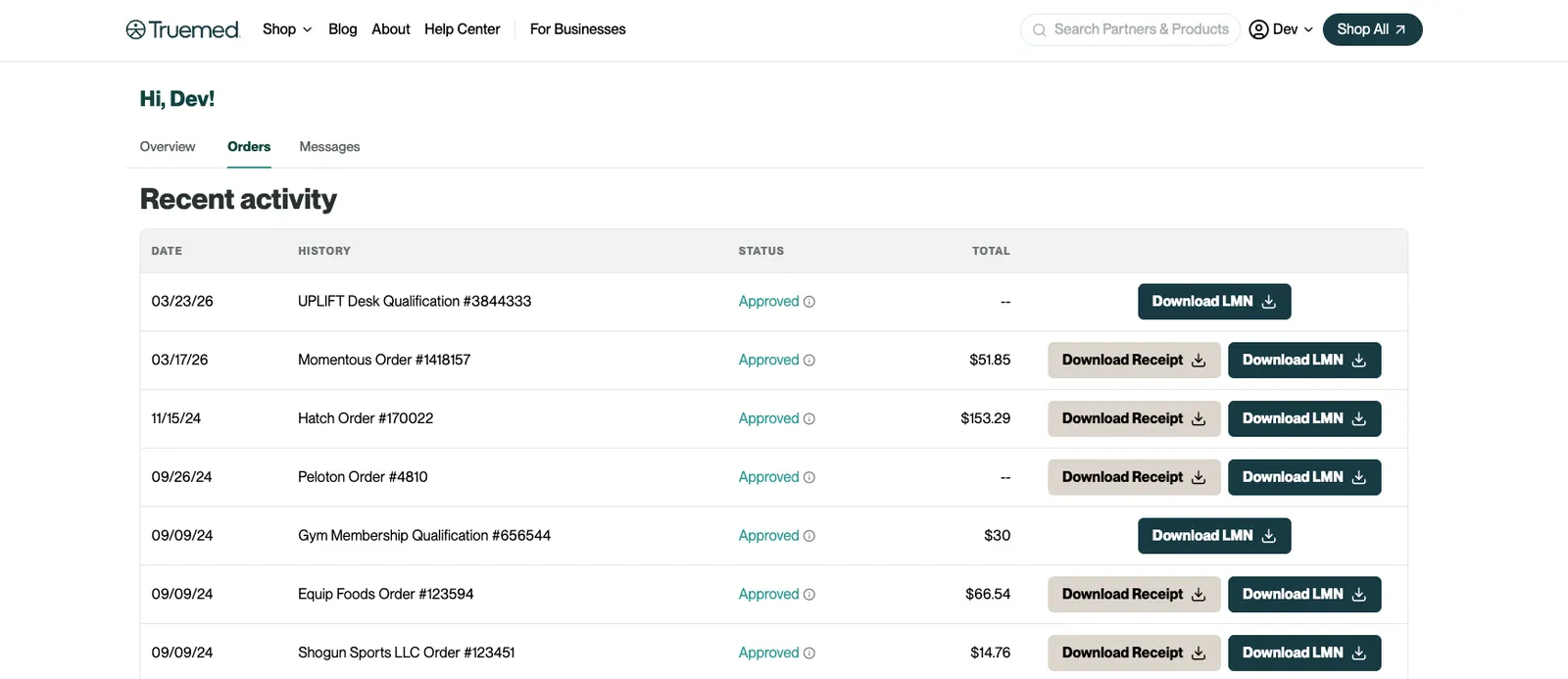
Since your HSA/FSA funds were already used at checkout, you may not need to submit a separate reimbursement claim. However, your administrator may request documentation for their records — in that case, the Truemed receipt and your LMN are the documents to provide.
Post-purchase reimbursement
If you paid with a regular debit or credit card and are now seeking reimbursement from your HSA or FSA administrator, the receipt you need is the one from the merchant — not a Truemed receipt. Because Truemed was not involved in your payment, Truemed does not generate a payment receipt for this path.
Where to find your merchant receipt:
- Check your email for an order confirmation from the merchant. This is typically sent immediately after purchase and serves as your receipt. It should include your name, purchase date, item(s), and total amount paid.
- Log into the merchant’s website. Most merchants have an order history page where you can view and download past receipts.
- Contact the merchant directly. If you cannot locate your order confirmation, reach out to the merchant’s customer support and ask for a copy.
What to submit to your HSA/FSA administrator:
For a post-purchase reimbursement claim, you will typically need to submit two documents together:
- Your Truemed LMN: available in your Truemed dashboard on your Overview page under Download Documents
- Your merchant receipt: the order confirmation from when you made your purchase
Truemed provides the medical necessity documentation; the merchant receipt confirms what you purchased and what you paid.
Receipt requirements for reimbursement
Regardless of which path you used, HSA and FSA administrators typically require that receipts include:
- Provider or merchant name — identifies where the purchase was made
- Patient name — must match the name on your LMN
- Date of purchase — confirms the transaction falls within your coverage period
- Product or service name — clearly identifies what was purchased
- Product or service description — explains what the item is and what it does
The description field is especially important. Administrators may flag receipts that use vague language like “membership,” “program,” or “class.” If you used Truemed payment at checkout, the Truemed receipt includes plain-language descriptions to help administrators recognize your purchase as an eligible medical expense. If you’re on the post-purchase reimbursement path, make sure your merchant receipt clearly itemizes what was purchased.
If your receipt is missing
Truemed payment at checkout (orders):
- Check your email, including spam and promotions folders.
- Log into your Truemed dashboard at truemed.com and check the Download Documents section on your Overview page or the individual order in the Orders tab.
- If you still can’t find it, email support@truemed.com with your name, the merchant name, and your purchase date. The team can look up your transaction and resend your receipt.
Post-purchase reimbursement:
- Check your email for the merchant’s order confirmation.
- Log into the merchant’s website and check your order history.
- Contact the merchant directly to request a copy of your receipt.
Submitting to your TPA
Your third-party administrator (TPA) is the company that manages your HSA or FSA account. When you submit a reimbursement claim:
- Download your LMN from your Truemed dashboard at truemed.com, on your Overview page under Download Documents
- Gather your receipt (Truemed receipt for Truemed payment at checkout orders; merchant receipt for post-purchase reimbursements)
- Log into your TPA’s portal and navigate to the reimbursement or claims section
- Upload both documents — some administrators have separate upload fields for each; others accept them as a combined attachment
- Submit your claim and save any confirmation number you receive
If your TPA asks for a cost comparison document: Some administrators require a cost comparison when reviewing claims for HSA/FSA-eligible products like mattresses, treadmills, or other higher-cost items. This document shows the price difference between the standard version and the medically necessary version, confirming that the eligible amount reflects only the medically necessary portion of the cost.
For common products, Truemed automatically includes cost comparison documentation in your receipt or supporting documents. If you did not receive one and your administrator is requesting it, contact support@truemed.com with your order details.
Submitting your LMN, receipt, and any cost comparison document together in a single submission gives you the best chance of first-time approval.